


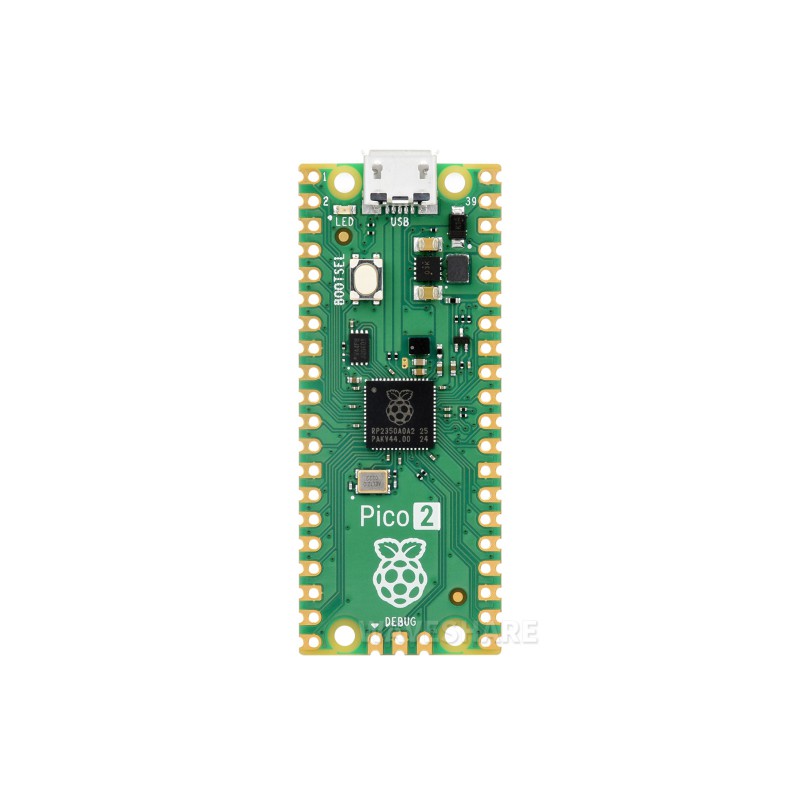
Raspberry Pi Pico 2 RP2350 Microcontroller Board
The Raspberry Pi Pico 2 RP2350 Microcontroller Board is a versatile development platform for embedded programming, electronics prototyping, automation, and robotics. It builds on the original Pico family with improved processing performance, double the SRAM, increased onboard flash storage, and additional security features.
Powered by the RP2350 microcontroller, Pico 2 can use two Arm Cortex-M33 processor cores running at up to 150MHz, or its alternative dual-core Hazard3 RISC-V architecture. Developers can program the board using C/C++ or MicroPython, making it suitable for beginners learning microcontrollers as well as experienced engineers developing custom hardware. Raspberry Pi
The board exposes multifunction GPIO pins for connecting sensors, displays, motors through suitable driver circuits, communication modules, and other peripherals. Its USB interface supports programming and data communication, while programmable I/O (PIO) provides flexible ways to implement custom digital interfaces.
Important: The standard Raspberry Pi Pico 2 does not include built-in Wi-Fi or Bluetooth. Those features are available on the separate Pico 2 W model. Raspberry Pi
Technical Specifications
| Specification | Details |
|---|---|
| Board Name | Raspberry Pi Pico 2 |
| Microcontroller | Raspberry Pi RP2350 |
| Processor | Dual Arm Cortex-M33 or dual Hazard3 RISC-V cores |
| Maximum Clock Speed | Up to 150MHz |
| Onboard SRAM | 520KB |
| Flash Memory | 4MB |
| GPIO | 26 multifunction GPIO pins exposed on the board |
| Analog Inputs | 3 user-accessible ADC inputs |
| Communication Interfaces | UART, SPI, I²C, USB |
| PWM | Multiple PWM channels |
| Programmable I/O | 12 PIO state machines |
| USB | USB 1.1 with device and host support |
| Programming Languages | C, C++, MicroPython |
| Wireless Connectivity | Not built into the standard Pico 2 |
| Board Format | Compact 40-pin board |
| Main Applications | Embedded systems, automation, robotics, and prototyping |
Specifications are based on the official Raspberry Pi Pico 2 documentation. Raspberry Pi
Key Features
- Dual-core processing: Supports two Arm Cortex-M33 cores or two Hazard3 RISC-V cores, operating at up to 150MHz.
- 520KB SRAM: Provides memory for program execution, sensor data, and embedded applications.
- 4MB onboard flash: Stores firmware and program files directly on the board.
- Flexible GPIO: Connects digital sensors, buttons, LEDs, displays, and external control circuits.
- Multiple communication interfaces: Supports UART, SPI, and I²C for interfacing with compatible modules and peripherals.
- USB programming: Allows firmware uploading and USB communication.
- Programmable I/O: PIO state machines enable custom digital communication protocols and timing-sensitive interfaces.
- C/C++ and MicroPython support: Suitable for both low-level firmware development and rapid prototyping.
- Enhanced security: RP2350 includes hardware security features such as Arm TrustZone support and SHA-256 acceleration. Raspberry Pi
Applications
- Arduino-style electronics and embedded programming projects.
- Robotics and motor-control systems using suitable driver circuits.
- IoT prototypes with an external Wi-Fi or Bluetooth module.
- Sensor monitoring and data acquisition.
- Home automation and smart-control systems.
- USB devices and custom controllers.
- LED effects, display interfaces, and programmable digital signals.
- Educational projects for learning C/C++, MicroPython, and microcontroller programming.
How to Get Started
- Connect the Raspberry Pi Pico 2 to a computer using a compatible USB data cable.
- Install a supported development environment, such as Thonny for MicroPython.
- If using MicroPython, download the appropriate Pico 2 firmware from the official Raspberry Pi website.
- Hold the BOOTSEL button while connecting the board to USB if required to enter its USB boot mode.
- Install the firmware following the official instructions.
- Write and upload your program, then connect compatible sensors or peripherals to the required GPIO pins.
Official resources: Raspberry Pi Pico 2 Documentation and Raspberry Pi Pico 2 Product Page.
Precautions
- GPIO voltage: The board uses 3.3V GPIO logic. Do not apply 5V directly to GPIO pins.
- Motor connections: Do not drive motors or other high-current loads directly from GPIO pins. Use a suitable driver.
- Power supply: Use a compatible power source and follow the board’s power-input specifications.
- Pin connections: Verify the pinout before connecting sensors, displays, or communication modules.
- Model selection: The standard Pico 2 does not have built-in wireless connectivity; choose Pico 2 W if onboard Wi-Fi and Bluetooth are required.
- Header pins: Standard Pico 2 boards may be supplied without soldered headers. Check the product listing before ordering.
- Firmware compatibility: Use firmware intended for RP2350-based Pico 2 boards rather than assuming all original Pico firmware will work unchanged.
YouTube Tutorial
Explore programming, firmware installation, and project tutorials here:
Raspberry Pi Pico 2 RP2350 Tutorials on YouTube
Buy Raspberry Pi Pico 2 in Pakistan
Looking for a microcontroller board for robotics, embedded systems, or electronics development? Visit Electroway.org to check product availability and ordering details.
5. Product Summary
The Raspberry Pi Pico 2 RP2350 is a compact, powerful microcontroller development board featuring dual-core processing up to 150MHz, 520KB SRAM, 4MB flash memory, and flexible GPIO connectivity. With C/C++ and MicroPython support, it is suitable for robotics, automation, sensor interfacing, USB projects, and embedded-system development.


Reviews
There are no reviews yet.