
Description
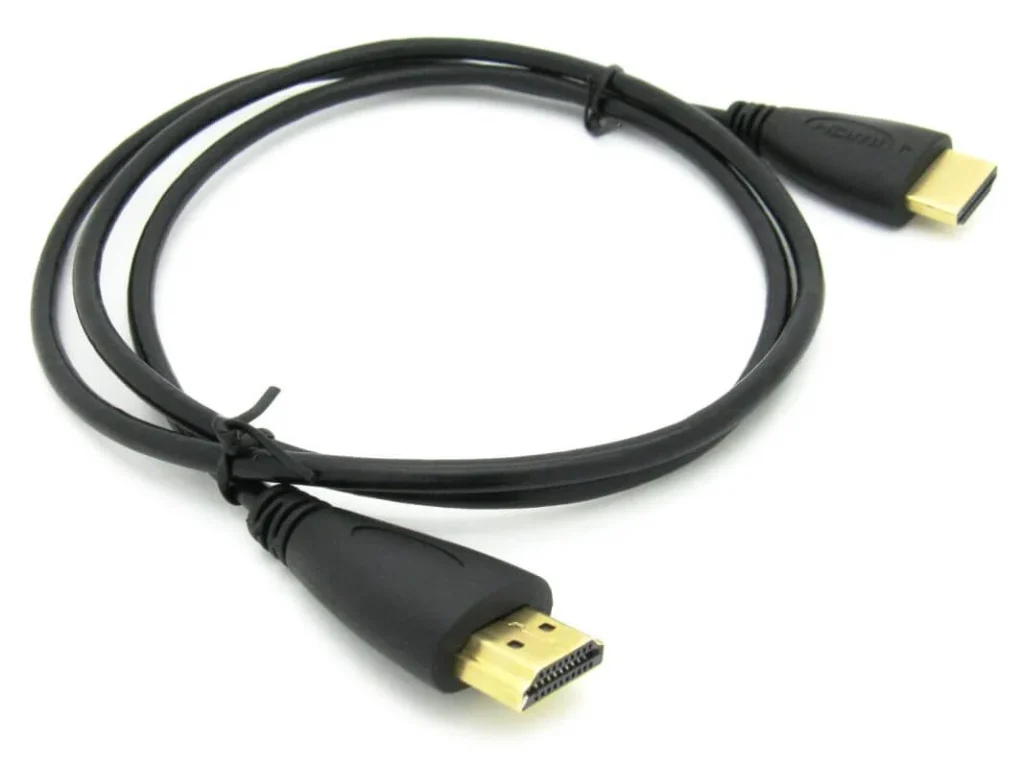
Raspberry Pi HDMI Cable 1m
The Raspberry Pi HDMI Cable 1m provides a wired video and audio connection between a compatible Raspberry Pi board and an HDMI-equipped display. It is useful for setting up a Raspberry Pi desktop, viewing the operating system interface, programming, multimedia playback and monitoring project outputs.
With a 1-metre cable length, it offers flexibility when positioning a Raspberry Pi near a monitor or television. HDMI carries digital video and audio through a single cable, helping reduce the need for separate display and audio connections.
Connector compatibility is important: Raspberry Pi models use different HDMI connectors. Raspberry Pi 4 and Raspberry Pi 5 have micro-HDMI ports, while Raspberry Pi 3 Model B uses a standard full-size HDMI port. Check the cable’s connector ends before ordering.
Technical Specifications
| Specification | Details |
|---|---|
| Product Name | Raspberry Pi HDMI Cable |
| Cable Length | 1 Metre |
| Cable Type | HDMI Display Cable |
| Connection | HDMI to HDMI or model-specific connector |
| Signal Type | Digital Audio and Video |
| Display Compatibility | HDMI-enabled monitors, TVs and displays |
| Application | Raspberry Pi display connectivity |
| Installation | Plug and Play |
| Quantity | 1 Cable |
Note: The exact connector type and supported resolution depend on the supplied cable version.
Raspberry Pi Compatibility
| Raspberry Pi Model | Required Cable |
|---|---|
| Raspberry Pi 3 Model B / B+ | Standard HDMI to HDMI |
| Raspberry Pi 4 Model B | Micro-HDMI to HDMI |
| Raspberry Pi 5 | Micro-HDMI to HDMI |
| Raspberry Pi Zero / Zero W | Mini-HDMI to HDMI |
Check the connector before ordering. Raspberry Pi 3 uses full-size HDMI, Raspberry Pi 4 and 5 use micro-HDMI, while Raspberry Pi Zero models use mini-HDMI.
Raspberry Pi Documentation+1
Key Features
-
1-metre cable length for convenient desktop connections.
-
Transfers digital video and audio through one cable.
-
Connects compatible Raspberry Pi boards to HDMI displays.
-
Suitable for Raspberry Pi desktop and development setups.
-
Simple plug-and-play installation.
-
Useful for programming, multimedia and electronics projects.
-
Compact design for home, office and laboratory use.
Applications
-
Raspberry Pi desktop computer setup.
-
Connecting Raspberry Pi to LCD monitors.
-
Raspberry Pi programming and development.
-
Smart home and IoT project displays.
-
Multimedia and media centre projects.
-
Robotics monitoring systems.
-
Educational computing and STEM projects.
-
DIY electronics workstations.
How to Use / Setup
-
Identify the HDMI connector available on your Raspberry Pi board.
-
Check that the cable has the correct connector for your Raspberry Pi model.
-
Connect one end to the Raspberry Pi HDMI port.
-
Connect the other end to an HDMI-compatible monitor or television.
-
Select the correct HDMI input on your display.
-
Power on your Raspberry Pi and check the display output.
Precautions
-
Confirm connector compatibility before purchasing.
-
Do not force the HDMI connector into the port.
-
Insert and remove connectors carefully.
-
Avoid bending or twisting the cable excessively.
-
Keep connectors clean and free from moisture.
-
Connect the display before powering on the Raspberry Pi for easier display detection.
YouTube Tutorial
Watch Raspberry Pi HDMI Cable Connection and Display Setup Tutorials
Buy in Pakistan
Looking for a Raspberry Pi HDMI Cable 1m in Pakistan? Explore Raspberry Pi accessories, display cables and electronics components at Electroway.org or through the Electroway App.
4. Product Summary
The Raspberry Pi HDMI Cable 1m is a practical display connection accessory for connecting compatible Raspberry Pi boards to HDMI monitors and televisions. Its compact 1-metre length makes it suitable for desktop computing, programming, multimedia and DIY electronics projects.

Reviews
There are no reviews yet.