


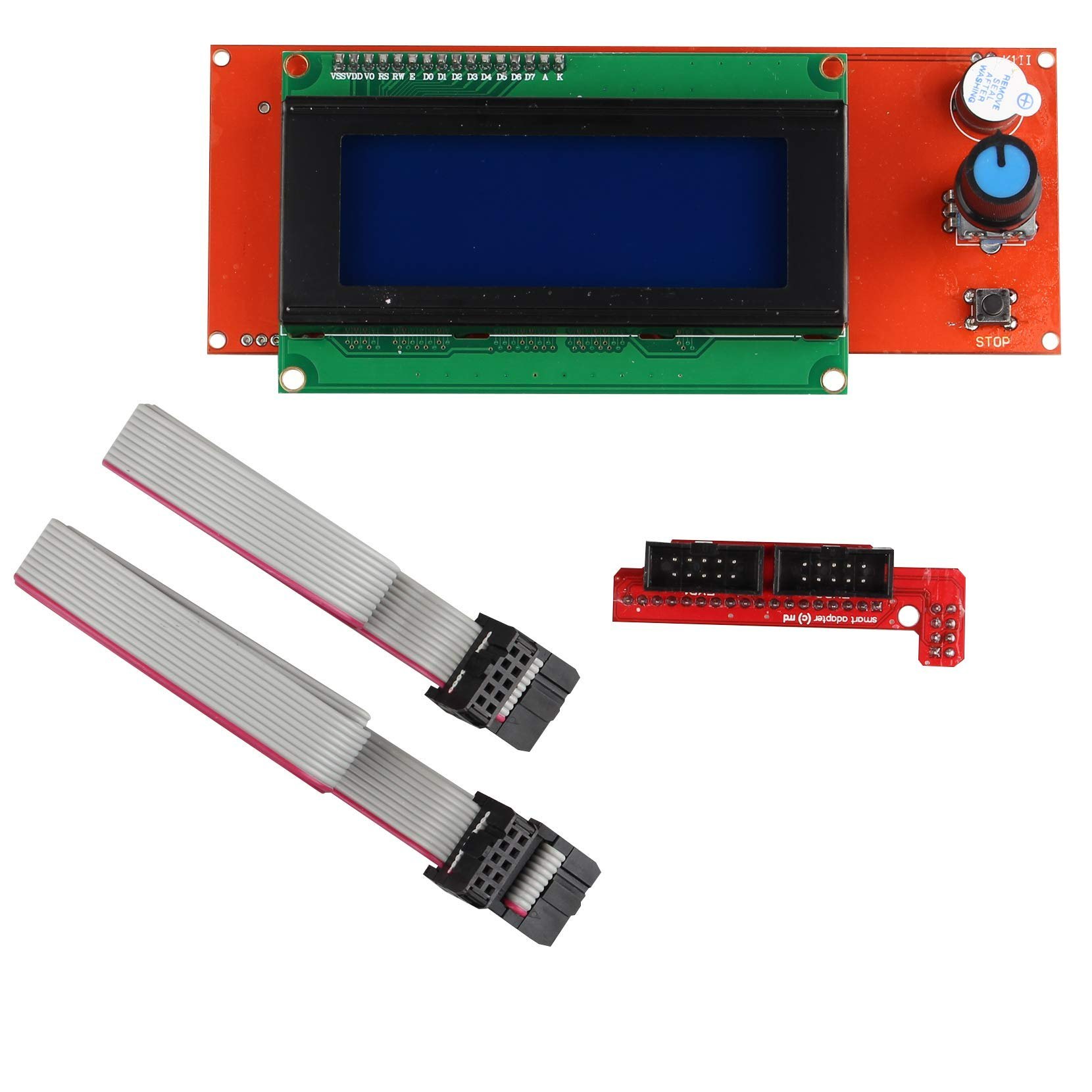
RAMPS 1.4 3D LCD Controller With SD Card Slot
The RAMPS 1.4 2004 LCD Controller is a practical upgrade for compatible RepRap-based 3D printers. Its 20-character × 4-line LCD displays printer menus and status information, while the rotary encoder lets users navigate options and select commands.
The integrated SD card slot allows users to load compatible G-code files and start prints directly from the controller, reducing the need to keep a computer connected during printing. When correctly connected to a compatible RAMPS board and supported by the installed firmware, the controller can also provide access to functions such as axis movement, calibration, and other printer settings. reprap.org
Technical Specifications
| Specification | Details |
|---|---|
| Product Type | 3D printer LCD smart controller |
| Display Type | Character LCD |
| Display Format | 20 characters × 4 lines (2004 LCD) |
| Memory Card Interface | Integrated SD card slot |
| User Input | Rotary encoder with push-button selection |
| Controller Compatibility | RAMPS 1.4-based 3D printer systems |
| Connection | Smart adapter and ribbon cables |
| Printing Method | Standalone printing from supported G-code files |
| Firmware Support | Requires compatible firmware configuration |
| Main Application | RepRap and compatible 3D printers |
Package contents and connector details may vary by product version. Confirm the included adapter and cables before ordering.
Key Features
- 20×4 LCD display: Shows printer menus, settings, and status information.
- SD card printing: Select supported G-code files for printing without a continuously connected PC.
- Rotary encoder control: Turn and press the knob to navigate menus and select commands.
- Printer adjustment: Access supported movement, calibration, and control functions through compatible firmware.
- RAMPS 1.4 integration: Connects through the appropriate smart adapter and ribbon cables.
- Convenient operation: Helps simplify routine control of a compatible 3D printer.
Applications
- RepRap 3D printers using RAMPS 1.4 electronics.
- DIY and educational 3D printer projects.
- Standalone 3D printing from SD card.
- Basic printer-menu navigation and supported movement controls.
- Replacement or upgrade of a compatible 2004 LCD controller.
How to Use and Set Up
- Connect the LCD controller’s smart adapter to the compatible RAMPS 1.4 board.
- Attach the supplied ribbon cables to the correct connectors, checking their orientation before powering on.
- Configure the printer firmware to support the controller and SD card. In compatible Marlin configurations, this commonly involves enabling
REPRAP_DISCOUNT_SMART_CONTROLLERand SD card support. - Copy a sliced, compatible G-code file to an SD card.
- Insert the card, navigate the LCD menu with the rotary encoder, and select the print file.
Firmware options vary by Marlin version, so follow the documentation for your installed version. marlinfw.org
Precautions
- Verify compatibility with your RAMPS board and firmware before purchasing.
- Switch off printer power before connecting or disconnecting cables.
- Check ribbon-cable orientation carefully to prevent connection problems.
- Do not force the connectors into their sockets.
- Use a compatible SD card and valid G-code files.
- If the display lights up without showing text, check the cable connections and adjust the LCD contrast carefully.
YouTube Tutorial
Find setup and installation guides here:
RAMPS 1.4 2004 LCD Controller Setup Tutorials on YouTube
Buy RAMPS 1.4 2004 LCD Controller in Pakistan
Upgrade a compatible DIY 3D printer with an LCD interface and SD card printing support. Visit Electroway.org to check product availability and ordering details.
5. Product Summary
The RAMPS 1.4 2004 LCD Smart Controller combines a 20×4 character display, rotary encoder, and SD card reader for convenient standalone operation of compatible RepRap 3D printers. With suitable firmware and the correct adapter, it allows users to select G-code files and access supported printer controls without keeping a computer connected.
Reviews
There are no reviews yet.