


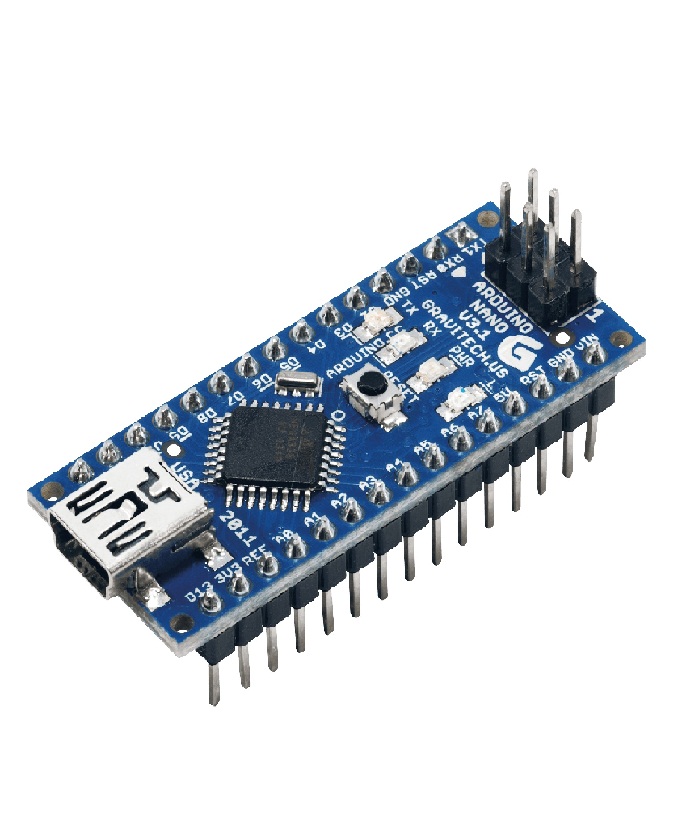
Arduino Nano V3.0 – Compact Microcontroller Development Board
The Arduino Nano V3.0 is a small, versatile development board designed for building electronic circuits and embedded applications where space is limited. Based on the ATmega328P microcontroller in the classic Nano design, it offers many of the capabilities of a traditional Arduino Uno in a compact form factor.
Its breadboard-friendly layout makes it convenient for prototyping, educational experiments, robotics, sensor monitoring, and automated control systems. The board can be programmed using the Arduino IDE, allowing beginners and experienced developers to create projects using C/C++-based Arduino sketches.
The Arduino Nano V3.0 is a practical choice for electronics students, hobbyists, engineers, and makers in Pakistan who need a compact controller for DIY electronics projects.
Key Features
- Compact design for breadboard-based prototyping
- ATmega328P microcontroller in the classic Nano V3.0 design
- 14 digital input/output pins
- 8 analog input pins
- 6 PWM-capable digital outputs
- UART, SPI, and I²C communication support
- USB connection for programming and serial communication
- Compatible with the Arduino IDE
- Suitable for robotics, automation, and embedded electronics
Technical Specifications
| Specification | Details |
|---|---|
| Board | Arduino Nano V3.0 |
| Microcontroller | ATmega328P |
| Operating logic voltage | 5V on the classic version |
| Recommended input voltage | Commonly 7–12V through VIN; verify board documentation |
| Digital I/O pins | 14 |
| PWM outputs | 6 |
| Analog inputs | 8 |
| Flash memory | 32KB, including bootloader space |
| SRAM | 2KB |
| EEPROM | 1KB |
| Clock speed | 16MHz |
| Communication | UART, SPI, I²C |
| Programming environment | Arduino IDE |
| USB interface | Depends on board version and USB-to-serial chip |
Note: Compatible Nano-style boards may use different USB-to-serial chips or microcontroller variants. Verify the actual board specifications before purchase.
Applications and Uses
1. Robotics Projects
Use the Arduino Nano to read sensors, control motor drivers, and build compact robots.
2. Sensor Interfacing
Connect compatible temperature, humidity, light, ultrasonic, and other sensor modules to collect data and trigger actions.
3. Home Automation
Develop prototype systems for controlling lights, switches, and other suitable low-voltage devices using appropriate driver circuits.
4. Embedded Systems
Integrate the board into compact electronic devices that require programmable input/output control.
5. Motor Control
Generate control signals for compatible motor drivers, servo motors, and stepper motor controllers.
6. Student and DIY Electronics
Learn microcontroller programming, circuit design, digital logic, and sensor-based automation.
Programming and Compatibility
The Arduino Nano V3.0 can be programmed using the Arduino IDE.
Basic setup steps:
- Connect the board to a computer using a compatible USB cable.
- Install or open the Arduino IDE.
- Select the appropriate Arduino Nano board and processor option.
- Choose the correct serial port.
- Upload a test sketch, such as Blink, to confirm that programming works.
Some clone boards use a CH340 USB-to-serial chip and may require a suitable driver. The exact processor selection can also depend on the bootloader used by the board.
Precautions and Usage Guidelines
- Check the board’s operating voltage before connecting sensors or peripherals.
- Do not apply 5V signals to a 3.3V-only peripheral unless the circuit supports level shifting.
- Avoid drawing excessive current from GPIO pins; use suitable drivers for motors, relays, and high-current loads.
- Check polarity carefully when connecting an external power source.
- Do not connect external power sources in conflicting configurations.
- Use an appropriate USB cable and select the correct board and processor settings in the Arduino IDE.
- Keep the board protected from short circuits, moisture, and electrostatic discharge.
Related Products at Electroway
Explore more products for your Arduino development projects:
YouTube Tutorial
Learn how to set up, program, and test the Arduino Nano V3.0:
Watch Arduino Nano V3.0 Setup and Programming Tutorials
Buy Arduino Nano V3.0 in Pakistan from Electroway
Looking for an Arduino Nano microcontroller board for robotics, automation, or electronics learning? Explore Electroway, an online electronics store serving students, hobbyists, and developers across Pakistan.
Store: Electroway
Website: https://electroway.org
Physical shop address: Please check Electroway’s official website or contact the store for the current location and product availability.
Product Summary
The Arduino Nano V3.0 is a compact ATmega328P-based microcontroller board suitable for sensor interfacing, robotics, automation, and DIY electronics. With digital and analog I/O, PWM outputs, and common communication interfaces, it provides a practical platform for embedded system development and electronics prototyping.
Reviews
There are no reviews yet.