


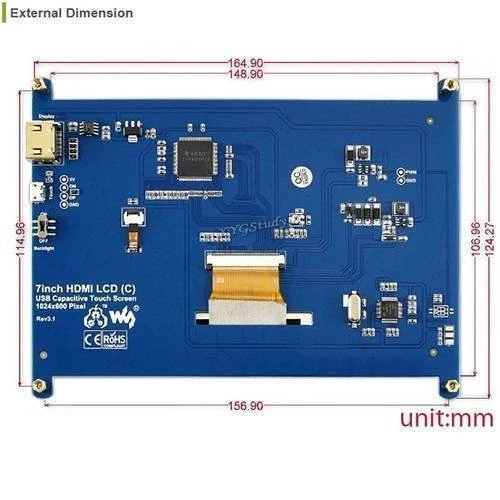
7 Inch HDMI LCD Capacitive Touch Screen for Raspberry Pi
The 7 Inch HDMI LCD Capacitive Touch Screen for Raspberry Pi provides a practical touchscreen interface for Raspberry Pi projects, computers, and other devices with HDMI video output. Its 7-inch display offers a useful balance between screen size and compact dimensions, making it suitable for desktop projects as well as custom enclosures.
With a 1024 × 600 pixel resolution, the LCD provides clear text, graphics, menus, and video playback. The capacitive touch panel allows users to interact directly with compatible software using taps and other supported touch gestures, eliminating the need for a separate mouse or keyboard in many applications.
Video is transmitted through the HDMI interface, while the touch function is connected through USB. This straightforward connection method makes the display suitable for Raspberry Pi dashboards, smart home interfaces, POS terminals, kiosks, robotics controllers, portable computers, and other DIY electronics projects.
The display can also be used with compatible PCs and mini computers, making it a flexible option when a small HDMI touchscreen is required.
Technical Specifications
| Specification | Details |
|---|---|
| Product Type | HDMI LCD Capacitive Touch Screen |
| Screen Size | 7 Inches |
| Display Type | LCD |
| Resolution | 1024 × 600 Pixels |
| Touch Technology | Capacitive Touch |
| Video Input | HDMI |
| Touch Interface | USB |
| Touch Function | Multi-Touch Support* |
| Backlight | LED |
| Operating Voltage | 5V DC |
| Compatible Platform | Raspberry Pi and HDMI-Compatible Devices |
| Raspberry Pi Compatibility | Raspberry Pi 5, 4, 3 Series and other compatible models |
| Installation | Desktop or Embedded Mounting |
| Application | Touchscreen Interface and Display |
*Touch features can vary depending on the operating system, drivers, and connected device.
Applications
- Raspberry Pi touchscreen projects
- Smart home control panels
- Home automation dashboards
- Robotics interfaces
- Industrial monitoring systems
- DIY kiosks and information terminals
- POS and control interfaces
- Portable Raspberry Pi computers
- Media and video playback
- Embedded electronics projects
- Educational and STEM applications
Precautions
- Confirm that your Raspberry Pi or computer provides a compatible HDMI video output.
- Use a stable, regulated 5V power source as recommended for the display.
- Connect the HDMI and USB cables securely before powering the screen.
- Do not press the touchscreen with sharp objects or excessive force.
- Keep the LCD panel away from water, excessive heat, and direct physical impact.
- Clean the screen with a soft, dry or slightly damp microfiber cloth.
- Check software and driver compatibility before relying on advanced touch functions.
Related Products
- Raspberry Pi Boards
- Raspberry Pi Accessories
- Display Modules
Reviews
There are no reviews yet.