Description
20 segment LED Bar Display Yellow Color in Pakistan
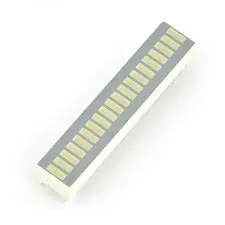
The 20 Segment LED Bar Display – Yellow Color is an electronic display component designed to represent changing values through illuminated LED segments. It contains twenty individual LED elements arranged in a compact linear format, allowing users to display different levels or measurement values visually.
Each segment can be controlled individually through a suitable electronic circuit or LED driver. As the input value changes, additional segments can illuminate to create a bar-style indication.
The yellow LED colour provides clear visual identification and makes this display useful for electronic instruments, control panels, monitoring systems and DIY projects.
It is suitable for electronics hobbyists, students, engineers and developers working with Arduino and other microcontroller platforms.
Technical Specifications
| Specification | Details |
|---|---|
| Product Name | 20 Segment LED Bar Display |
| Display Type | LED Bar Graph Indicator |
| Number of Segments | 20 |
| LED Colour | Yellow |
| Display Arrangement | Linear Bar |
| LED Configuration | Individual LED segments |
| Mounting Type | Depends on supplied package |
| Control Method | LED driver or individual segment control |
| Applications | Voltage, audio and level indicators |
Technical note: Exact dimensions, pin configuration, common-anode/common-cathode arrangement, forward voltage and current ratings depend on the supplied model. Check the datasheet before connecting the display.
Key Features
-
20 LED segments: Provides more indication levels than a standard 10-segment display.
-
Yellow illumination: Offers a distinctive visual indication.
-
Individual segment control: Allows different bar levels to be displayed.
-
Compact design: Suitable for electronic instruments and control panels.
-
Microcontroller compatibility: Can be interfaced with suitable Arduino and embedded systems.
-
Versatile functionality: Useful for displaying signal strength and changing measurement values.
Applications
-
Arduino LED bar graph projects
-
Battery charge-level indicators
-
DC voltage monitoring systems
-
Audio level meters
-
Signal strength indicators
-
Sensor measurement displays
-
Electronic testing instruments
-
Industrial control panels
-
DIY electronics and educational projects
Installation / Setup
-
Identify the display pinout using its datasheet.
-
Check whether the display uses a common-anode or common-cathode configuration.
-
Connect each LED segment through an appropriate current-limiting resistor.
-
Use a suitable LED driver or microcontroller circuit to control the segments.
-
Connect the display to the required power and control connections.
-
Test each segment individually before using the complete bar display.
Arduino tip: For controlling twenty LED segments, consider using suitable LED driver ICs or shift registers to reduce the number of GPIO pins required.
Precautions
-
Verify the display pin configuration before applying power.
-
Use appropriate current-limiting resistors.
-
Do not exceed the specified LED forward current.
-
Confirm the operating voltage and polarity.
-
Avoid connecting all segments directly without checking the microcontroller’s current limitations.
-
Use a suitable driver circuit for reliable operation.
-
Follow the manufacturer’s datasheet for correct wiring.
YouTube Tutorial
20 Segment LED Bar Display Arduino Tutorials
Buy from Electroway Pakistan
Explore LED displays, bar graph indicators, resistors, Arduino boards, microcontrollers and other electronic components at Electroway.org.
You can also browse available products through the Electroway App.
Product Summary
The 20 Segment Yellow LED Bar Display is a visual indicator component featuring twenty individual LED segments. It is suitable for battery monitoring, voltage indication, audio level meters, sensor displays and various Arduino-based electronics projects.


Reviews
There are no reviews yet.