Description
MACH3 USB CNC Interface Board BL-UsbMach-V2.0
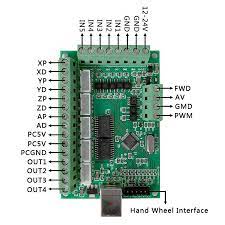
The MACH3 USB CNC Interface Board BL-UsbMach-V2.0 is designed for controlling CNC machines through a computer running compatible MACH3 control software. It provides an interface between the computer and external motor drivers, allowing users to control machine movements across five axes: X, Y, Z, A, and B.
This CNC controller board is suitable for DIY CNC routers, engraving machines, milling systems, and other compatible computer-controlled machining equipment. It includes connections for limit switches, emergency-stop inputs, probing, spindle control, and auxiliary outputs.
With a maximum step-pulse frequency of 100 kHz, the board supports precise motion control when paired with compatible drivers, motors, and properly configured software. Electronic Solution
Technical Specifications
| Specification | Details |
|---|---|
| Product Name | MACH3 USB CNC Interface Board |
| Model | BL-UsbMach-V2.0 |
| Interface | USB |
| Supported Axes | 5-axis: X, Y, Z, A, B |
| Maximum Step-Pulse Frequency | 100 kHz |
| Compatible Software | MACH3 with the appropriate USB motion plugin |
| Motor Driver Support | Compatible stepper and servo motor drivers |
| Driver Signal Configuration | Common-anode or common-cathode, depending on driver compatibility |
| Spindle Control | 0–10V output and forward-direction control |
| Auxiliary Outputs | 4 isolated output interfaces for compatible relay control |
| General-Purpose Inputs | 5, including support for limit switches, probing, and emergency-stop functions |
| Tool Probe Support | Yes |
| Emergency-Stop Input | Yes |
| Limit Switch Support | Yes |
| Electronic Handwheel | Supported |
| Signal Isolation | Optical isolation for specified interfaces |
| External Supply | 12V/24V, as specified for the board |
| Approximate Dimensions | 90 × 60 mm |
| Main Applications | CNC routing, engraving, milling, and motion-control projects |
Specifications are based on available product documentation. Confirm the exact power requirements, connector assignments, and compatibility with your particular board revision before installation. Electronic Solution
Key Features
1. Five-Axis CNC Control
Supports motion control across five axes, making it suitable for compatible CNC machines that require multi-axis positioning.
2. USB Computer Interface
Connects to a computer through USB, eliminating the need for a traditional parallel-port interface when used with the appropriate motion-control plugin.
3. High-Speed Pulse Output
Supports step-pulse frequencies up to 100 kHz for controlling compatible stepper or servo motor drivers.
4. Spindle Speed Control
Provides a 0–10V spindle control output and a forward-direction signal for compatible spindle controllers.
5. Limit Switch Support
Allows compatible limit switches to be connected to help detect machine travel limits and support homing functions.
6. Emergency-Stop Input
Provides an input for an emergency-stop circuit. The machine’s emergency-stop system should also be designed to safely disable hazardous motion and equipment.
7. Auxiliary Outputs
Four isolated output interfaces can be used with compatible relay circuits to control auxiliary equipment, such as coolant pumps and other machine accessories.
8. Optical Isolation
Optical isolation on specified interfaces helps separate control signals and reduce the transfer of electrical interference.
9. Probe and Handwheel Support
Supports compatible probing equipment and electronic handwheel functions for CNC positioning and setup. Hallroadlahore.pk
Applications
The MACH3 USB CNC Interface Board can be used in a variety of CNC and automation projects.
- CNC Router Machines: Controls compatible motor drivers for cutting and engraving operations.
- CNC Engraving: Suitable for engraving designs on compatible materials.
- CNC Milling Machines: Provides motion-control signals for compatible milling systems.
- DIY CNC Projects: Useful for building or upgrading computer-controlled machines.
- Woodworking Machines: Can control suitable CNC routers used for cutting and carving wood.
- PCB Engraving: Suitable for compatible machines used in printed circuit board prototyping.
- Automation Projects: Supports multi-axis motion-control systems designed around the board’s capabilities.
Actual performance depends on the motor drivers, motors, machine mechanics, software configuration, and power supply.
Installation and Setup
Follow these general steps to set up the interface board:
- Check compatibility: Confirm that your computer, MACH3 installation, and CNC motor drivers support the board.
- Install the software: Install a compatible MACH3 version.
- Install the USB plugin: Place the correct motion-control plugin in the MACH3 Plugins folder according to the manufacturer’s instructions.
- Connect the board: Use a suitable USB cable to connect the controller to the computer.
- Provide external power: Connect the required external supply according to the board’s wiring diagram.
- Connect motor drivers: Wire the X, Y, Z, A, and B outputs to compatible stepper or servo drivers.
- Connect safety inputs: Wire the limit switches, probing input, and emergency-stop circuit correctly.
- Configure spindle control: Connect the 0–10V output and direction signal only to a compatible spindle controller.
- Configure MACH3: Select the correct USB motion plugin and configure the axis signals, motor settings, input signals, and spindle parameters.
- Test carefully: Test each axis at low speed without cutting material before operating the complete machine.
Software compatibility note: Do not assume that every version of Windows supports this board directly. Verify the plugin’s operating-system requirements and compatibility with your MACH3 installation before purchasing or configuring the controller. Hallroadlahore.pk
Precautions
- Use only the specified external supply voltage.
- Verify the board’s power terminals and polarity before connecting power.
- Confirm that motor drivers support the board’s signal type and wiring configuration.
- Do not connect stepper motors directly to the interface board; use compatible motor drivers.
- Check all wiring before powering the CNC machine.
- Use properly rated relays and interface circuits for auxiliary equipment.
- Follow the spindle controller’s specifications when connecting the 0–10V output.
- Test the emergency-stop circuit before operating the machine.
- Keep the board protected from conductive debris, moisture, and accidental short circuits.
- Follow appropriate CNC machine safety procedures during testing and operation.
YouTube Tutorial
Learn more about installation, wiring, and MACH3 configuration:
Watch MACH3 USB CNC Interface Board BL-UsbMach-V2.0 Tutorials
Buy MACH3 USB CNC Interface Board in Pakistan
Looking for a USB motion controller for your CNC machine? Visit Electroway to check product availability and current pricing.
You can also explore the Tools and Accessories category for related tools and workshop accessories.
4. Product Summary
The MACH3 USB CNC Interface Board BL-UsbMach-V2.0 is a five-axis motion-control interface for compatible CNC machines. With USB connectivity, 100 kHz step-pulse output, spindle control, limit-switch inputs, probing support, and auxiliary outputs, it is suitable for CNC routing, engraving, milling, and DIY automation projects. Correct software configuration and compatible external motor drivers are essential for reliable operation.

Reviews
There are no reviews yet.